Installing the components
The deployment of the Simplitics PDQ platform is managed through a modular, container-based architecture, ensuring high flexibility across environments. It features a strictly defined startup sequence and centralized metadata control via the Active Metadata Engine (AME).
The core tools deployed are AME, INGEST, DLS, and DWA, along with supporting components like the Developer UI and Caddyserver.
Deployment Prerequisites and Infrastructure Setup
The PDQ platform components are deployed as Docker containers and can run on any container-based environment, including any cloud provider or on-premise installation.
System requirements
| Minimum | Recommended | |
|---|---|---|
| Docker Engine | 20.10+ | 24.0+ |
| RAM | 8 GB | 16 GB |
| CPU | 4 cores | 8 cores |
| Storage | 100 GB | 500 GB |
| Database | Shared | Dedicated instance (SQL Server, PostgreSQL or another supported engine) |
Verify the host before you start:
docker --version
docker compose version
VM and Core Dependencies
Deployment typically begins on a VM (e.g., EC2 Ubuntu 22.04) prepared with the following configuration:
- Disk Setup: An extra disk (e.g.,
/datadrive) must be created and mounted (e.g., usingmklabel gptandmkfs.xfs). This disk is used for the Docker data root. - Docker Configuration: The Docker engine, CLI, and plugins must be installed. The
/etc/docker/daemon.jsonfile must be edited to define the data root ("data-root": "/datadrive/docker") and configure rotating logs ("max-size": "10m","max-file": "3"). - Component Location Strategy:
- AME and DLS: Run close to each other in the same region as the repository database.
- DWA: Preferably in the same region as the database.
- INGEST Agents: Preferably deployed close to the data source to minimize network data transmission.
Deployment of Core PDQ Tools (Service Orchestration)
The components are managed by systemd service files enforcing a strict, linear dependency chain using Requires= and After= directives.
Correct Sequential Startup Order:
simplitics-ui.service(Base Service, requires only Docker).simplitics-ame.service(Active Metadata Engine - starts after UI).simplitics-dls.service(Data Lake Service - starts after AME).simplitics-dwa.service(Data Warehouse Automation - starts after DLS).simplitics-ingest.service(Data Importer - starts after DWA).
To start the entire stack, the installer only needs to enable and start the last service in the chain (simplitics-ingest.service).
1. Active Metadata Engine (AME) Deployment
- Security Isolation: All mapped ports in the
ame-compose.ymlfile must be deleted. AME services must be isolated to the internal Docker network to prevent external access. - API Communication: AME is the central API hub, serving all configuration and instructions to INGEST, DLS, and DWA.
2. INGEST (Data Importer) Deployment
- Deployment Model: INGEST runs as a container (one per source connection) and operates as an agent that can be deployed anywhere, needing only an API connection back to AME.
- Container Start: Initiated with the source system name as a runtime parameter (e.g.,
command: -n <SOURCESYSTEMNAME> -f teams.yaml). - Teams/API Integration: Requires Azure AD App Registration, client secrets, and configuring the AME connection via API endpoint
/api/v3/ingest/connection/for/:sourcesystemwithAPIAuthMethodset to"OAuth 2.0".
3. DLS (Data Lake Service) Deployment
- Container Scaling: DLS runs as several containers (minimum 6) utilizing workers that can scale based on virtual capacity.
- Functionality Deployment: Configuration details (file structure,
rawZonePath,targetMethod) are deployed via API calls to AME using the endpoint/api/v3.1/sourcefiles/:sourceFilename. - Streaming Configuration: High-performance streaming for large XML/JSON files is enabled by setting
useForSplittingRecordsto1on a specific hierarchy level via a backend API update.
4. DWA (Data Warehouse Automation) Deployment
- Deployment Location: DWA runs as several containers (minimum 4) and should preferably be in the same region as the database.
- Configuration Deployment: Relies on three main metadata inputs, submitted via API/DevUI:
- Target Model definitions (objects, keys, relations).
- Source description (from DLS).
- Source-to-Target Mappings (LOGIC), including attributes and filtering.
- Orchestration: DWA uses APIs to describe the source, create a runtime schedule, and log progress.
Post-installation configuration
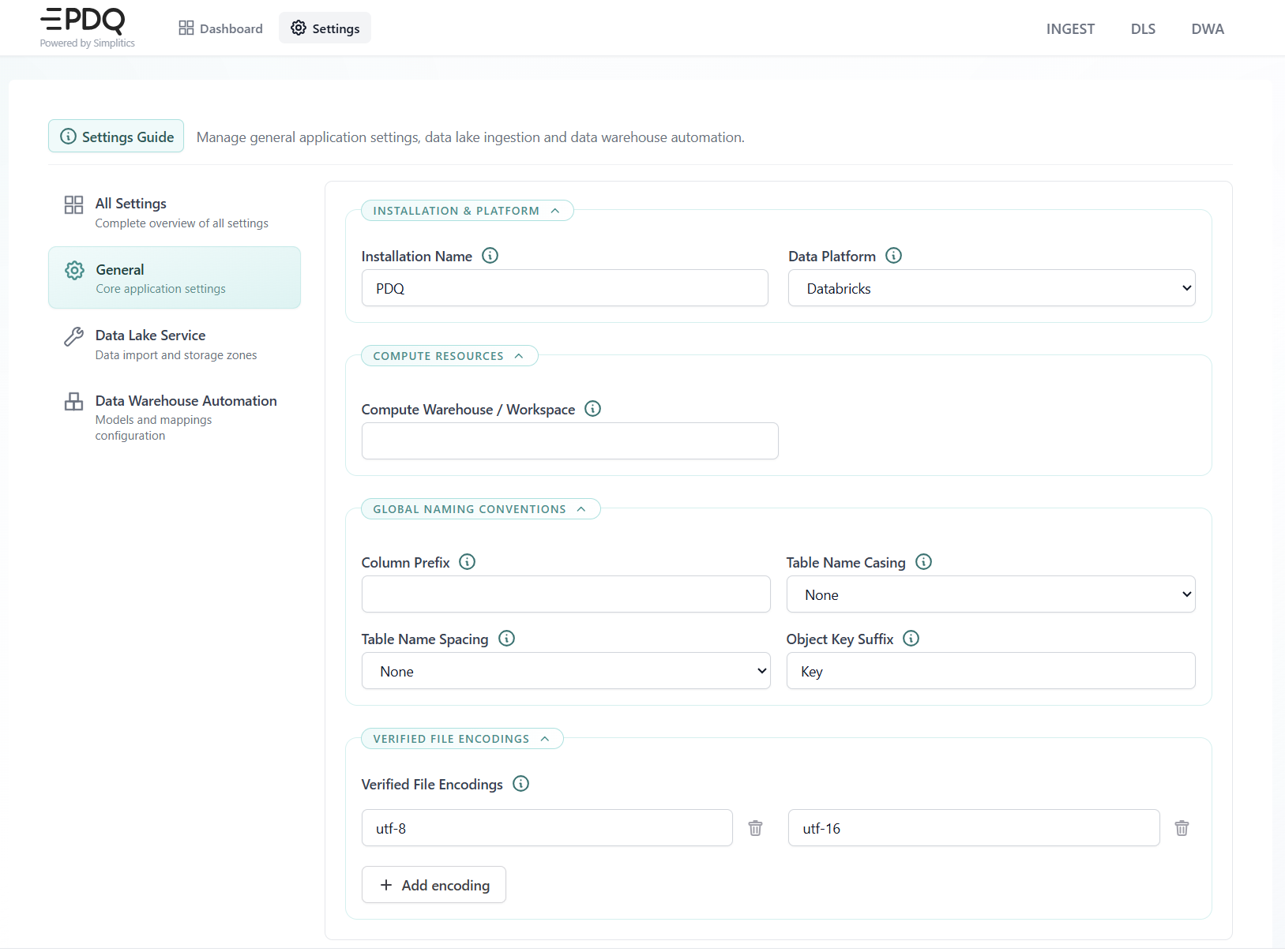
Once the stack is running, open Settings in the Developer UI and set the installation-wide values before the first load:
- Installation name and Data platform — the target engine the SQL generator writes for (Snowflake, Databricks, SQL Server, Synapse, Fabric or PostgreSQL).
- Compute warehouse / workspace — the compute the platform runs against.
- Global naming conventions — column prefix, table name casing, table name spacing and object key suffix. These are applied by the SQL generator to every generated object, so set them before generating target tables.
- Verified file encodings — the encodings DLS accepts for incoming source files.
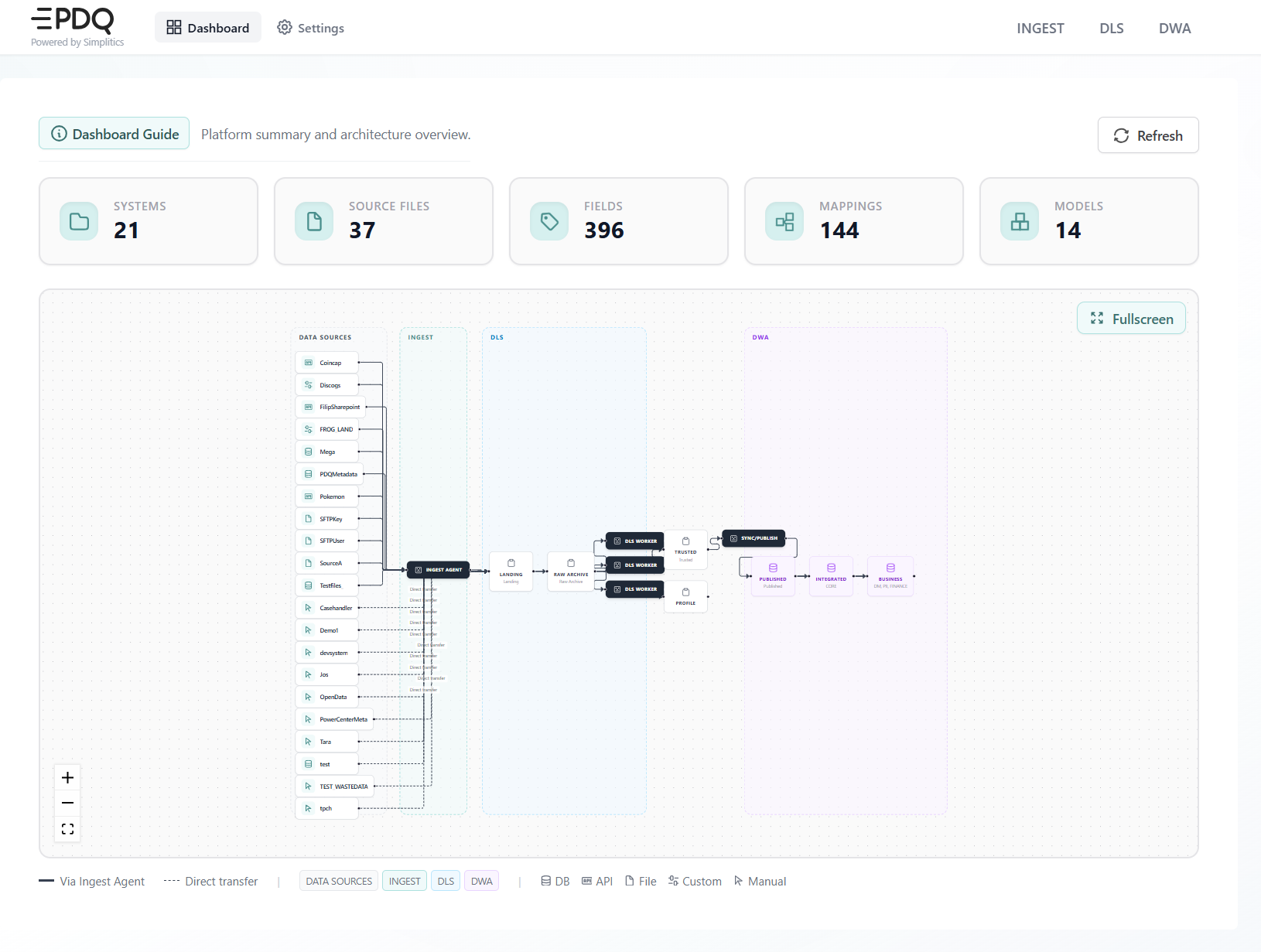
The Dashboard confirms that the stack is up and reachable: it counts the configured systems, source files, fields, mappings and models, and draws the end-to-end flow across INGEST, DLS and DWA.
Security and Access Deployment (Caddyserver)
The implementation of Caddyserver requires specific network and security configuration:
- DNS Requirement: The PDQ machine must use a Fully Qualified Domain Name (FQDN).
- Firewall Opening: Ports 80 and 443 must be accessible on the server, but only from within the customer's environment (not publicly accessible).
- New Network: A new Docker network (e.g.,
xx_caddynet) must be created. - Entra (Azure AD) Authentication: Requires:
- App registration (e.g.,
sp-pdq-caddy-demo) with a Redirect URI including the FQDN and HTTPS port (e.g.,https://{dns_name}:{port}/auth/oauth2/azure/authorization-code-callback). - Defining Entra groups (
pdq_web_admins,pdq_web_developers,pdq_web_viewers) and updating the App registration to include a group claim to retrieve user permissions.
- App registration (e.g.,
Maintenance and Upgrade Procedures
- General Troubleshooting: The common resolution for infrastructure problems (e.g., VM crash) is to stop and start the virtual machine from the cloud portal.
- Container Restart: If issues persist, execute
docker compose downfollowed bydocker compose up -dfor all components (AME, UI, DLS, DWA, INGEST, TOOLS). - Upgrades: Stop all Docker services. Update the Compose files to reference the new release tag (e.g.,
Xx:release_v25.6.1), and perform a manual pull to fetch the new images. - Secrets Re-encryption: After an upgrade involving encrypted secrets, perform a
GETrequest to retrieve the unencrypted configuration and immediatelyPOSTthe response back to the AME API endpoint (e.g.,/api/v3/ingest/connection/for/{sourcesystem}) to trigger the encryption process.
Deployment as a Digital Factory Assembly Line: Deploying PDQ is like setting up a complex, self-managing digital factory. The AME acts as the blueprint archive and central command center, defining every machine's purpose via APIs. Each worker (INGEST, DLS, DWA) is a specialized containerized unit, powered up in a strict, linear sequence (the assembly line startup) to prevent chaos. The use of containers ensures the factory floor can be installed anywhere (any cloud). Caddyserver functions as the secure gatekeeper, ensuring that only authenticated personnel (Entra ID users) can access the command center and internal systems, protecting the entire operation from external interference.